Saturday, October 18, 2014

Triangulum Galaxy and other shots from September 30th

I failed at shooting the Triangulum Galaxy the last time, but now I had a bit better conditions. Seems like the 150 second exposures before were result of a extreme luck with alignment. This time even 120 s seemed to trail a bit but 100 second worked.


Here's 10x100 seconds stacked with Mosstack. Full photo in https://flic.kr/p/pHia6c and Astrobin entry here http://www.astrobin.com/129577/. Seems like focus was off. I adjusted it after this stack so the rest objects are more sharp.

I'm actually a bit surprised to get that much color on the photo. Stacking with IRIS gives even more blue, but I'm trying to process all my photos with my own stacker. I use IRIS for comparison only. Here's what IRIS was able to do.

Post processing is done with Darktable so full processing with open source software only.

Something more...

I took couple of shots at Pleiades just to see if I can get any nebula visible. 


There indeed is some and it's blue. There always could be more so more photo sessions required with this object. Full photo here https://flic.kr/p/pr8VMw and Astrobin entry here http://www.astrobin.com/129580/.

And now something without any nebulosity: the Double Cluster.


I had shot this one before as well and my idea was to compare these two to see the development of my gear and me. The previous photo is here and full version of the new here.

Monday, September 15, 2014

Dumbbell nebula, Ring nebula and exposure tests

The sky was clear on September 13th and I planned to shoot some stars before Moon rises. I thought I had prepared everything, but turned out I hadn't charged cameras battery. Luckily there was enough power to last until Moon lit up the sky. Maybe 15 minutes more had been possible but nevertheless... everything went better than I expected.

First some more tests about exposure times. 80 second was easily possible the last time, now I tried some more.

100 second exposure (left) and 150 second exposure (right)
100 seconds looked good so I took 150 second. When I look at the photo on computer screen I'm not sure about 150s. Most stars look ok, but maybe some show some trailing. I have to run final tests about this on a better ground. This time the mount was a bit unstable. So I'm not sure whether the trail is caused by mount shifting on ground or incorrect alignment.

Result was something between 100 and 150 seconds so I chose 120 as exposure time for shooting the Triangulum Galaxy.

Triangulum Galaxy M33


This failed. Moon was rising and it's glow had lit the eastern sky. Air humidity was also quite high and some fog did form a while later so all that made Triangulum a wrong target for that night. Still I spent 10 x 120 seconds worth of time and battery on what you see above. Also I managed to tilt the camera couple times so only seven photos were usable.

Well... You can see it and maybe even recognize it as M33. Bigger photo (if really necessary) in https://www.flickr.com/photos/96700120@N06/15063242487/

Ring nebula M57

After the Triangulum failure, I realized the sky was more clear of light pollution right in zenith. Lyra and Ring nebula was the first thing that came in mind. Couple of photos there and only one of them was not tilted during exposure. I really have to stay away from the mount during shooting...


This is a single 120 second exposure. Quite nice. Although focal length of 200 mm is quite short for M57. Bigger photo in https://www.flickr.com/photos/96700120@N06/15063241107/

Dumbbell Nebula M27

Battery indicator was blinking red but I thought I'd use all the remaining power to shoot the Dumbbell nebula. It was also in a dark spot of the sky. Now the exposures are only 30 second and I took 10 of them but still this is what I got:


I'm impressed. Last time I tried M27 was with my old 75-300/4-5.6 zoom lens. I got a faint gray smugde. Now the aperture was 2.8 and my faint smudge has some real color! Can't wait to take some longer exposures of this.

Here's one a bit zoomed to show in the preview on Facebook or G+. :)


Bigger photo in https://www.flickr.com/photos/96700120@N06/15048413067/ and one with more stars around it in https://www.flickr.com/photos/96700120@N06/15047931927/. There's also open cluster of NCG6830 on the bottom if this image.

Tuesday, September 9, 2014

Proper alignment of EQ3-2 and first photos of the season

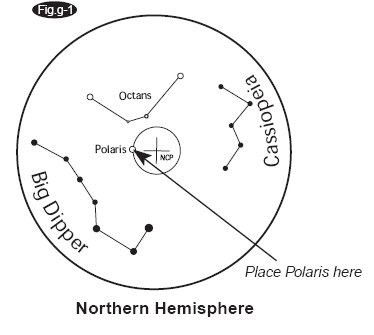
I've had problems with aligning the EQ3-2 even though I have a polar scope. For some reason I misunderstood the instructions totally. I always assumed the scope shows some kind of fish eye view and the constellations visible should cover the real stars. Nope.

View from polar scope. Image linked from
http://stargazerslounge.com/topic/158612-is-there-an-eq5-pro-synscan-goto-manual/#entry1602579
The scope shows Big Dipper and Cassiopeia from northern hemisphere and Octans from the south. Place polaris here circle is exactly as it says, but the rest are just directions where the constellation should be. This was the information I was lacking.

Now I made a somewhat good alignment and started to look through the scope. Polaris was by chance quite close to the circle. With couple of minutes of screwing and unscrewing the legs I got Polaris right where it should be. Now the tests...

With rough alingment I got maybe 20 second exposures with 200 mm optics without the stars trailing. Once or twice 25 to 30 seconds was possible close to celestial pole. Now I tried 30 s, 45 s, 60 s, 70 s and when that worked I took 20 exposures with 80 second time.


Here's an single shot to how the stars don't trail with 80 second exposure.

The Moon was up and almost half so sky was kind of lit. Before this it has never bothered me too much since my exposures were so short, but now it was a problem. I tried to stack my Andromeda photos and the result was worse than my previous best one (with 25s exposures). There's really no point of posting that image here.

After Andromeda photos were shot I decided to try the Whirpool galaxy. I knew the Moon makes that difficult so the result won't be good. Before this I haven't had any image of it. Now I got this


From nothing to this. Now I'll just wait for a better conditions (no Moon) and try again.

Sunday, August 24, 2014

Mosstack 0.5 - Mikko's Open Source Stacker for astronomical images

Finally a new version and a new unimaginative name.

What's new?

  • Name! PyAstroStack was only a temporary name I came up with when I created a directory for the source code. The py prefix and camel case started to annoy me so I wanted to change it now.
  • Multithreading in Gui. Most operations can run in parallel utilizing more than one core from CPU
  • Settings in Gui. Command line is not required anymore, but I'm not going to drop it.
  • Icon and shortcut in your desktop environments menu
  • Packages for Debian Jessie and Sid
  • Lot of changes under the hood making mosstack a lot stable than the older versions.
You can get the program from https://bitbucket.org/mikko_laine/pyastrostack/downloads. On Ubuntu I suggest using the ppa archive:

sudo add-apt-repository ppa:mikko-laine/pyastrostack

The repository is still under the old name. After this update sources and install package mosstack.

Next I'll start working on some kind of a manual. If you're familiar with the stacking process (know lights, darks, flats and biases) the program should be quite straightforward to use.

Friday, August 22, 2014

AstroStack: Closing on 0.5 release and roadmap to future releases

No, there's no new name. I didn't come up with anything. The name is now AstroStack and executable is astrostack with no CamelCase. I'll also change distribution package names and Gentoo and Ubuntu releases to lowercase.

Since there's a graphical user interface now I thought it would be nice to have an icon as well. I'm not sure if my graphic skills even match my coding skills, but here it is:
I'm also including a .desktop file so AstroStack will be found in the menu of desktop environments that support these files. My understanding is that they all should.

A release candidate (RC3) is already uploaded in BitBucket and Launchpad. The program itself is working fine on RC3 (at least it seems so...), but lacks documentation, .desktop file has some problems and the icons are in wrong format. I hope I have enough time to finalize this on the weekend. Now that I go to work again after one year of child care leave, my time on this project is more limited.

Roadmap to future releases:

Some planned features:

0.6

  • A manual
  • Frame information table on Gui. There's already a place holder for it but no functionality. Click a frame from the list and this should show all the extracted info.
  • Have command line interface use the same methods on class Frame the Gui uses
  • Setting for choosing memory limits for stacking. I have no idea how to limit by megabytes, but I can choose how many pieces the stack is split into. This could somehow depend on the setting.

0.7 or later

  • Show frame when clicked. Maybe as a pop up window.
  • Choose the reference frame which the rest are aligned to.
  • Choose cropping from the reference frame. This will save a lot of time and memory during the stacking process.

Wednesday, August 6, 2014

Problem of giving a name for software

PyAstroStack was supposed to be a temporary name I gave to the directory holding the code. I planned to change that before uploading anything to a public repository. Then after 0.1 I decided 0.2 is going to have a proper name, but no...

Now I'm planning the same for 0.5. I'm also planning on moving the public repo from BitBucket to Github so the name should be decided before that. I'm just out of ideas.

What do I want from the name?

The most important thing is simplicity of writing it. Even with Bash's autocomplete with tab, difficult commands are a pain to type. The current name is quite good from this point of view but I have to drop the capitals from command names. What was I thinking when I named the executable "AstroStack"?

Secondly I'd like the name to be relevant in some way. The program stacks astronomical images, yes, current name seems to work here as well. I've been thinking names of star constellations, nebulae, galaxies and so on, but haven't found anything sufficient. Different versions are currently being named after constellations. 0.2 was Andromeda, 0.4 was Orion and 0.5 is Cassiopeia. This name is only visible at the git branch at the moment, but maybe I'll put it in a more visible place in the future.

Third thing is, I don't want the name to be boring like pyAstroStack. I've been thinking an acronym, like so many other open source software have, but I lack the imagination for this. Also the acronym should form some relevant word.

Maybe I'm too stuck with the word stacker. All my ideas seem to include that. I should try something completely different. Or maybe I'll stick with this after all. In that case I'll drop the py prefix.

Any ideas?

Thursday, July 31, 2014

pyAstroStack: Multithreading vision and status

The GUI of pyAstroStack works reasonably well (for such a limited gui that is...) in version 0.4, but my original plan was a little different. Now that I have time to code again after summer, I'm finally getting my vision to work.

Here's a screenshot of current 0.5dev


Vision

I want the list of files to be more interactive. First column shows the file path, second is frame type, but the rest are what I'm working on. Decoded means reading the RAW file and decoding it to FITS. Numbers 0, 1 and 2 are place holders for "Not started", "Working..." and "Done". I'm not sure if I want some kind of icons or rolling animations there, but for now only the place holders.

The moment you select some images and click OK, the program starts decoding them on background. Gui will be responsive all this time and you can select more files while it's working. You can also set parameters for full process while it's working on background.

Status

My problem was that even I had multithreading set up, the gui stayed unresponsive and didn't update. I searched and read lots of tutorials and stackoverflow questions, but no help. Finally I found it! I had

threadpool = QThreadPool()

but instead it should have threadpools parent as an argument. I changed it into

threadpool = QThreadPool(self)

and everything started working. This might be obvious for more experienced PyQt programmers, so I can understand why no tutorial emphasized the importance of it. Maybe now I remember that all QWidgets require the parent as an argument.

Decoding works with 5 simultaneous threads, but with 10 there are random errors. I wonder if the threads are trying to use same files at the same time. If so, it has to be fixed. The rest of the program is currently broken (on 0.5dev, on 0.4.1 it works of course) because I had to do significant changes to the frame handling to get multithreading to work.